Built, shipped, and demonstrable.
No borrowed logos and no rounded-up numbers. Both entries are engineering tools we built and run ourselves — which is why we can open the inside of each one for you, live, on real data, in the first conversation. That is the standard every entry here meets.
In-house tools · built & in use
Everything here is ours, built and running.
 Real — our own tool
Case 01 · Custom software
The estimating engine: generate the quotation instead of rebuilding it.
The context. A fabrication quotation is an engineering document. Behind every price sits a weight calculation, a material build-up, labour hours, surface treatment, inspection and margin — assembled by a qualified engineer, usually in a spreadsheet, usually under deadline.
The problem. Each quote is rebuilt from the last one, edited in place, priced partly from memory. A revision request restarts the work. The pricing method lives in one file and one head — and when REV C differs from REV B, nobody can say exactly why.
The work itself is not difficult. It is repetitive, precise, and unforgiving of a mistyped decimal — exactly the shape of work a custom-built tool should carry.
5 manual stages · again at every revision
1 entry task · the arithmetic is the system's job
What Valtrin built
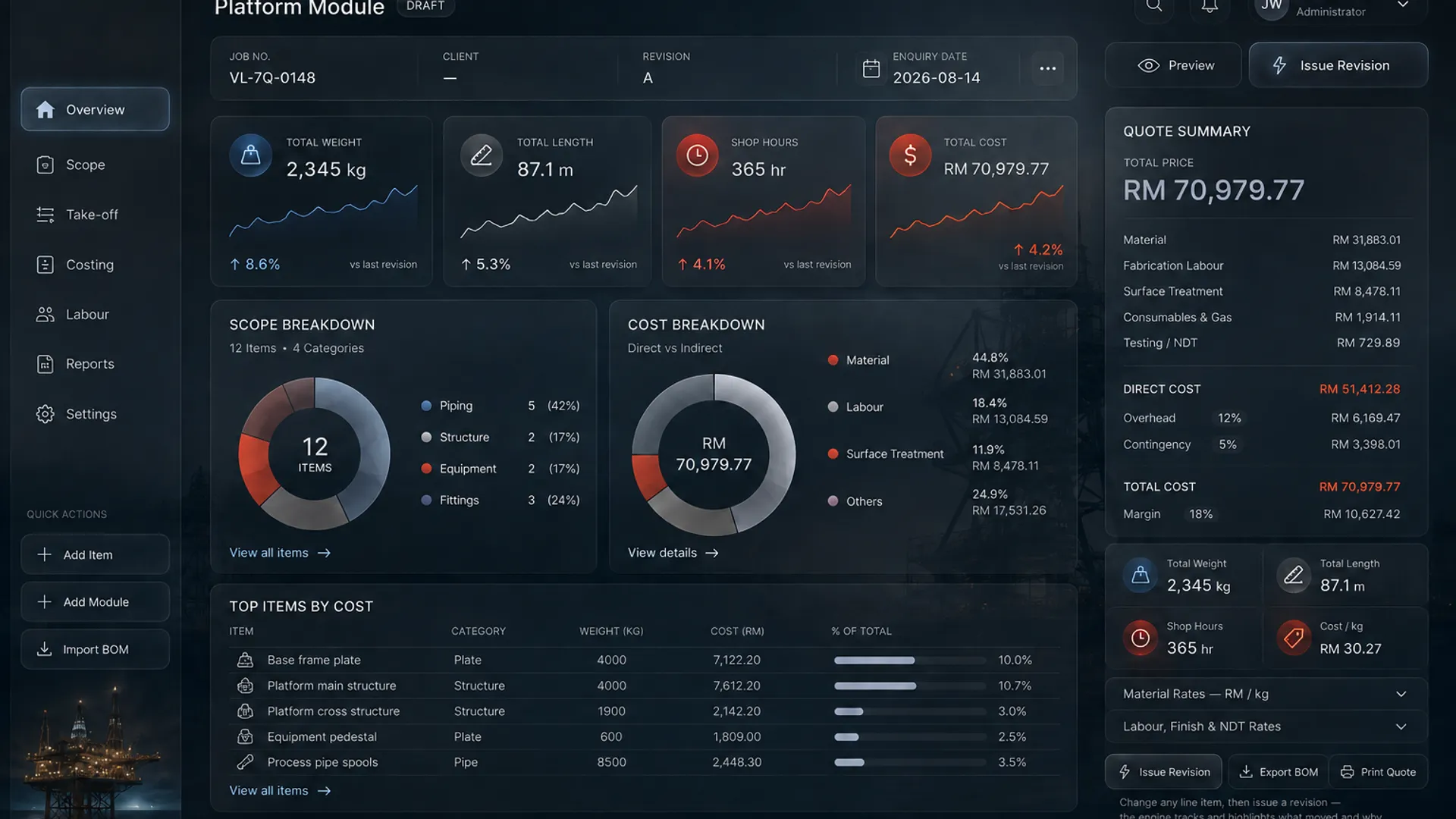
A custom-built estimating application. Quotation, weight, BOM and labour build-up are computed from published engineering data — steel section tables, plate gauges, structural section tables. Sections are priced by metre, plate by weld-metre banded on thickness, with grade multipliers for carbon and stainless. Every rate is editable, because in a real build the rates are yours. Nothing is a lookup of a finished price — the cost builds up the way a shop builds it.
There is no AI anywhere in the arithmetic. Every number comes from deterministic code: same input, same answer, every time — which is what makes the output auditable, and what makes the validation below possible.
Key functions
Quotation generation
Enter the scope once; the quotation assembles itself in the shop's own format, ready to issue.
Weight & material cost
Computed from published data — pipe schedules, flange masses, section tables — as each line item is typed.
BOM generation
The bill of materials falls out of the same line items. There is no second document to keep in step.
Labour build-up
Fabrication hours assembled the way a shop actually costs a job — not a single blended rate hiding the detail.
Revision comparison
REV B to REV C with a signed delta on every affected row. The spreadsheet can't tell you why. This can.
Editable rates
Material, labour, treatment, overhead, margin — every rate is yours to change, and the whole estimate follows.
Validation
The engine is validated against known results: feed it jobs whose outcomes are already trusted, and it must reproduce them — same inputs in, known totals out. The demonstration moment is a revision: switch a frame member from mild steel to stainless and lengthen it, and the weight falls while the price rises, with a signed delta on every affected row explaining exactly why.
Outcome
Quotation becomes an entry task instead of a rebuild. A revision becomes one change instead of an afternoon. The pricing method survives outside one person's spreadsheet — written down, in code, with a history that explains itself. The engine is real and demonstrable: ask for a walkthrough in the first conversation and watch it price a job live.
The interface
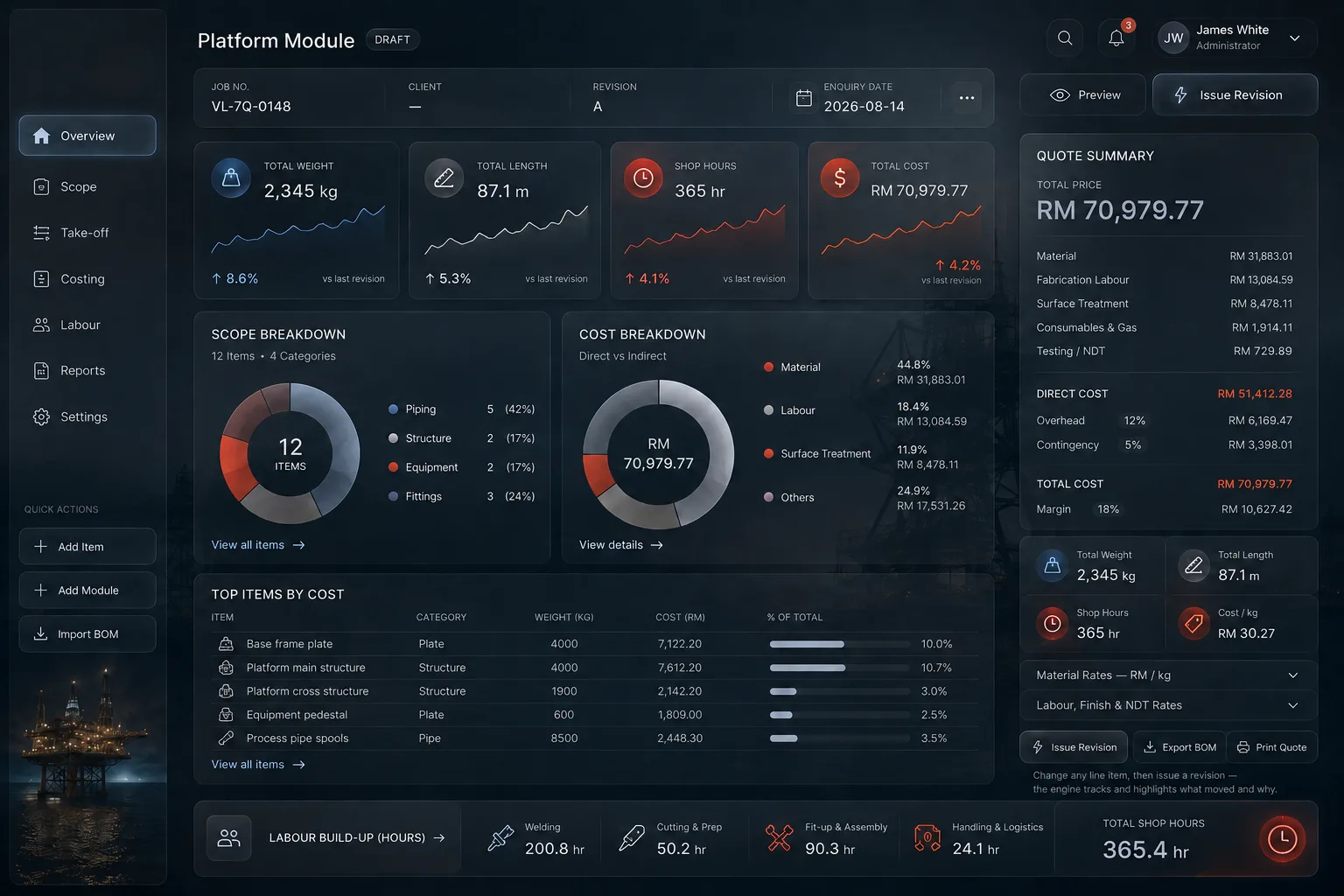
Number, client, enquiry date — the register starts here, not in a filename.
Plate, pipe, sections, flanges — weights and material cost computed from published data as you type.
Material, labour, treatment, inspection, overhead, margin — assembled the way a shop actually costs a job.
REV B to REV C shows every delta, signed. The spreadsheet can't tell you why — this can.
The engine is real and ours — opened live, on real data, in the first call.
The engine’s output, as documents
Case 02 · Custom software · Shipped, versioned, in use
Quadron: a week of drawing work, done in an afternoon.
What it took before. Laying out a tank module in general-purpose CAD is days of work, and almost none of it is engineering. You place vessels by hand and check clearances by eye. You count steel off the model into a spreadsheet. You estimate operating weight from assumptions nobody writes down. Then you draw the general arrangement separately, by hand, because the model will not produce it.
And then the module size changes. One dimension moves and all of it runs again — the arrangement, the steel count, the weights, the drawing. Four documents that have to agree, kept in agreement by somebody remembering to update all four. That is where the week goes, and it is also where the errors live.
What Quadron does instead. Set the module and the constraints. Paste in the vessel register. The application arranges the layout, resolves the constraints, builds the structure in 3D, computes the steel and operating weights, and generates the general arrangement drawing at true size — all from one model. Change the module and every one of those moves with it, because there is only one source for them.
Why it is on this page. It is the plainest evidence that the software Valtrin sells is the software Valtrin builds: a real constraint solver, real B‑Rep geometry, validated CAD export, and a Windows installer with a version history — not a prototype, and not a demo built for a website.
The workflow, end to end
Set the envelope
Module length and width, project name, column size. Everything downstream is driven from these.
Reference lines & columns
Place insert columns on reference-line intersections. Add dimensions, equality and collinear constraints. The solver reports fully constrained, under-constrained or conflicting.
Bands & walkways
Draw the vessel bands and the access ways between them. Every dimension stays editable and drives the model.
Rotating equipment
Reserve a footprint before the model exists, or import the supplier’s coloured STEP file. Mate it to the deck by picking its faces; drag, rotate, duplicate or replace it without disturbing a single band, vessel or column.
Auto-arrange & weigh
Paste the vessel register, apply, and the arrangement solves: working heights, groups, structural members, operating weights and the full 3D assembly.
Drawing & CAD
A true-size A3 general arrangement PDF, the schedule as CSV, and a coloured AP242 STEP solid model that opens in Inventor with its colours intact.
What is actually in it
Geometry & constraints
- A real constraint solver — dimensions, equality and collinear relations, with live status: green fully constrained, blue still free, red conflicting
- Auto-arrange from a pasted vessel register, resolving working heights and groups
- Analytic B‑Rep solids rebuilt in millimetres — not a mesh approximation
- Driving and driven dimensions with full-line preselection and a feature/constraint browser
- Hover-to-identify on every band, walkway, column, vessel, dimension and constraint
Weights & schedules
- Steel weight broken out by carbon and stainless, with a contingency allowance
- Operating weight — steel plus contents, computed from the actual rendered liquid envelope, not a rule of thumb
- Working volume, governing working height, deck height, distinct heights and group counts, all live
- Schedule to CSV straight out of the model
- Hover any figure to see the masses and volumes behind it
Drawing & CAD output
- General arrangement auto-generated as a true-size A3 PDF — the drawing is a product of the model, not a redraw of it
- Coloured AP242 STEP export that opens in Inventor with per-component colours preserved
- The export is read back and verified for valid solids and colour metadata before the file is released — a failed conversion leaves nothing behind
- Detailed source geometry used throughout: every access hatch is the full 85-solid CAD original, never the display mesh
- VRML output for review packages
Supplier models
- Import any supplier STEP file and reuse it as a local equipment asset across projects
- Defective supplier geometry is healed component by component — one bad leaf no longer rejects thousands of usable solids
- Pick the bottom and side faces; the model mates itself to the deck and records its true width, depth and height envelope
- Dimensions measure to the physical envelope, not the reserved clearance box, so a real edge can be dimensioned to a real steel edge
- Unresolved supplier warnings are reported, never silently swallowed
Walk it before it exists
- First-person inspection of the finished module — walk the deck, climb ladders, enter through hatches
- Collision against plates, baffles, columns, handrails and ladder cages, so clearance problems are found by walking into them
- Crouch under low headroom; the view stays crouched until there is room to stand
- Contents rendered to the true level, so a submerged view is a real check rather than a novelty
- Adjustable field of view and sensitivity, independent of the CAD navigation settings
Built to be used at work
- Fully offline. Remote requests are blocked by design — nothing about your project leaves the machine
- Native project files in readable JSON, with autosave recovery and Windows file association
- Heavy assemblies stay responsive: ten or more vessels batch into GPU instances, imports are cached, and export runs on background threads
- Shipped as a signed-ready Windows installer with version metadata — currently at v1.6, with an upgrade path preserved across every release
- Staged progress with measured time remaining on long imports, and honest elapsed time where a percentage would be invented
Built and owned by Valtrin. It is a design and visualisation aid: inputs, material selections, weight estimates, clearances and exported drawings are checked and approved by competent engineering personnel before anything is procured or fabricated. A valid STEP file is not fabrication certification, and the application says so on the way in. The industry it was written for is not named here, and it is not sold as a product — it is on this page because it shows the depth of engineering behind everything Valtrin builds: a real constraint solver and verified CAD output. Ask for the walkthrough — it runs live, on real parameters, in the first conversation.
The standard